
VIRTBIZ Internet Services
  • 0 Shopping Cart
  • Home
  • Store
    • Browse All
    • Web Hosting
    • Virtual Private Server
    • Dedicated Server
    • SSL Certificate
    • Register a New Domain
    • Transfer Domains to Us
    • WP Toolkit
  • Announcements
  • Knowledgebase
  • Network Status
  • Affiliates
  • Contact Us
  • More
  • Account
    • Login
    • Forgot Password?
  1. Portal Home
  2. Knowledgebase
  3. Web Hosting
  4. cPanel - Control Panel
  5. How to Edit or Delete a Cronjob in cPanel

  Categories

Billing & Accounts
21
Dedicated Server
44
Domains and Registration
12
Server Colocation
9
Web Hosting
239
WordPress
18

  Categories

  Tag Cloud

add bill blacklist block blocklist bounce cancel change clean ip colocation colocrossing contact credit card datacenter dcad debit card domain email exempt godaddy hotmail imap ip address ipad iphone irs netsol network solutions online outlook pay port 25 port 587 registration rejected remove sales tax service settings SMTP SSL submission port tax There is a problem with this website’s security certificate transfer w-9 w9 Your connection is not private Your connection is not secure

  Support

My Support Tickets
Announcements
Knowledgebase
Downloads
Network Status
Open Ticket

How to Edit or Delete a Cronjob in cPanel Print

  • 0

How to Edit a Cronjob?
1. Log in to your cPanel account.

2. In the Advanced section, click on Cron Jobs.


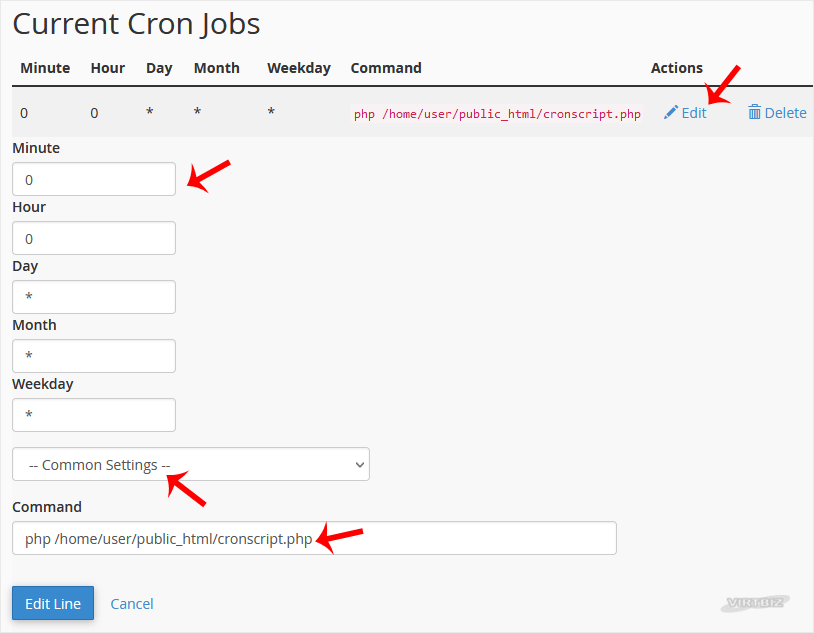
3. Scroll down to the end of the page. Under Current Cron Jobs, locate your cronjob and click on Edit.

4. Make the appropriate changes and then click on Edit Line.


How to Delete a Cronjob?
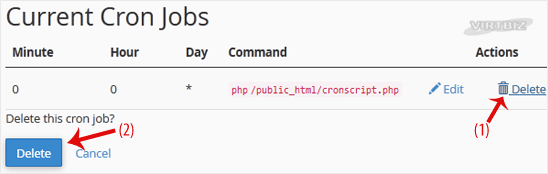
1. Under Current Cron Jobs, locate your cronjob and click on Delete.


2. Under the Delete this cron job?, click on Delete.


Was this answer helpful?

Related Articles

How to Reset cPanel's Account Password If you have access to your cPanel account, follow these steps to reset your password:1. Log in to... How to Change cPanel's Style/Theme Switching over to another cPanel theme with a different style is easy.1. Log in to your cPanel... How to Upload Files via the cPanel File Manager You can use cPanel's inbuilt file manager instead of an FTP program. 1. Log in to your cPanel... How to Edit (Dot)htaccess File in the cPanel File Manager 1. Log in to your cPanel account. 2. In the Files section, click on File Manager. 3. Navigate... How to Check the Disk Usage and the Bandwidth Usage of Directories If you are getting a disk space usage warning from cPanel and don't know which directory is using...
« Back

  Tag Cloud

add bill blacklist block blocklist bounce cancel change clean ip colocation colocrossing contact credit card datacenter dcad debit card domain email exempt godaddy hotmail imap ip address ipad iphone irs netsol network solutions online outlook pay port 25 port 587 registration rejected remove sales tax service settings SMTP SSL submission port tax There is a problem with this website’s security certificate transfer w-9 w9 Your connection is not private Your connection is not secure

  Support

My Support Tickets
Announcements
Knowledgebase
Downloads
Network Status
Open Ticket
  • Contact Us
  • Terms of Service

Copyright © 2026 VIRTBIZ Internet Services. All Rights Reserved.


Loading...
Loading...
Choose language
العربية
Azerbaijani
Català
中文
Hrvatski
Čeština
Dansk
Nederlands
English
Estonian
Persian
Français
Deutsch
עברית
Magyar
Italiano
Macedonian
Norwegian
Português
Português
Română
Русский
Español
Svenska
Türkçe
Українська

Generate Password

Please enter a number between 8 and 64 for the password length